How do I freeze my card?

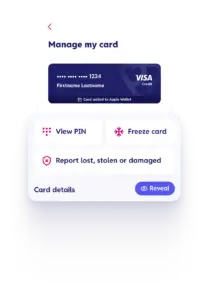
You can freeze your card straight away in the app:

  • Tap ‘Manage card’ on the home screen
  • Tap ‘freeze card’

Manage card screen in the app showing the option to report freeze a card

Jump to the Manage card screen.

When you freeze your card, any spending in store or online will be blocked and any upcoming subscriptions you pay with your card could be affected.

You can unfreeze your card at any time by tapping ‘unfreeze card’ in the app.

Related FAQs

Do you have a live chat service?
No, we don’t at the moment, but this help centre is packed with guidance and support to manage your credit card account. If you still need to speak to us, visit our contact us page
Arrow Icon
How do I report my card lost or stolen?
If you know your card is lost or stolen, report it and place an immediate stop on the card in the Vanquis app ...
Arrow Icon
How can I increase my credit limit?
After you've had your card for six months, we'll review it monthly to see if you're eligible for a credit limit increase ...
Arrow Icon